Showing posts with label Internet. Show all posts

Friday, August 23, 2019

Complete Internet Repair

Complete Internet Repair is a free Open Source Power Tool to repair internet connections and get you up and running in no time. Please note that it is unable to repair hardware faults or get your ISP up and running or not yet. In short; Complete Internet Repair will attempt to repair your internet connection.

Complete Internet Repair might help (no promises) if you are experiencing any of the following problems:
- Internet or network problem after removing adware, spyware, virus, worm, Trojan horse, etc.
- Loss network connection after installing/uninstalling VPN, firewall or other networking programs.
- Unable to access any website or can only access some websites.
- Pop-up error window with network related problem description.
- No network connectivity due to registry errors.
- DNS lookup problem.
- Fail to renew the network adapters IP address or other DHCP errors.
- Network connectivity issue with limited or no connections message.
- Windows update does not work.
- You are having problems connecting to secured websites (ex. Banking).
- Internet Explorer stopped working or crashes all the time.
- Sticky proxy server settings.

Source  : www.rizonesoft.com/

Tuesday, August 20, 2019

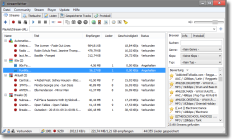
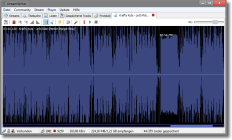
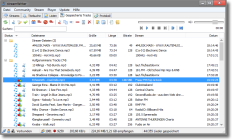
Stream-Ansicht mit Stream-BrowserSchneiden von LiedernGespeicherte Tracks

streamWriter is a free application for windows that records music broadcasted by internet-radiostations.
Current version: 5.5.0.0

To download streamWriter click here.
Features
Record as many streams as you want at the same time (MP3/AAC)
Automatically record a wishlist's song when it's playing on a stream
Player for streams and recorded files
Track splitting with silence detection
Function for manual cutting of saved titles
Tracks are named by a given pattern
Short songs (ads) can be skipped
Writing of tags to recorded files
Script-based postprocessing
Applying of effects to recorded songs (SoX)
Integration of different audio encoders
Scheduled recordings
Stream browser
Multilingual ()
Can be installed or used in portable mode
...and much more!

News
streamWriter 5.5 released 14.08.19

streamWriter is now compatible with Delphi 10
Added window for setting regular expressions for streams
Fixed minor bugs
Updated libraries
streamWriter 5.4.2.0 released 29.07.18

Updated libraries
Fixed a bug leading to an application crash

Friday, February 13, 2015

ChromePass password recovery tool

ChromePass is a small password recovery tool that allows you to view the user names and passwords stored by Google Chrome Web browser. For each password entry, the following information is displayed: Origin URL, Action URL, User Name Field, Password Field, User Name, Password, and Created Time.
You can select one or more items and then save them into text/html/xml file or copy them to the clipboard.

Homesite : http://www.nirsoft.net/
Download ChromePass

Saturday, January 24, 2015

information about IP address
Description

IPNetInfo is a small utility that allows you to easily find all available information about an IP address: The owner of the IP address, the country/state name, IP addresses range, contact information (address, phone, fax, and email), and more.

This utility can be very useful for finding the origin of unsolicited mail. You can simply copy the message headers from your email software and paste them into IPNetInfo utility. IPNetInfo automatically extracts all IP addresses from the message headers, and displays the information about these IP addresses.

Homesite : http://www.nirsoft.net/
Download

Sunday, January 18, 2015


JDownloader is a free, open-source download management tool with a huge community of developers that makes downloading as easy and fast as it should be. Users can start, stop or pause downloads, set bandwith limitations, auto-extract archives and much more. It's an easy-to-extend framework that can save hours of your valuable time every day!

Homesite : http://jdownloader.org/

Choose your operating system:

Windows :
Downloadserver #1 jdownloader.org Download Windows WebInstaller JD1(recommended)

Linux :
Downloadserver #1 jdownloader.org Download Installer (chmod +x jd_unix_0_9.sh)
Downloadserver #2 jdownloader.org Download (MULTIOS Zip)
Downloadserver #3 launchpad.net Download (Ubuntu Package)

Mac :
Downloadserver #1 Mac OS X 10.5 Leopard or lowerDownload (DMG)
Downloadserver #2Mac OS X 10.6 or higher (JD 2 BETA)Download (DMG)

Java :
Downloadserver #1 jdownloader.org Download (MULTIOS ZIP without Installer)

JD Developer Server

Thursday, January 15, 2015


Description:
This program is great, it's easy to use, it's small, and you don't need to install it.
It tweaks your connection speed to go the fastest it can, by changing your registry values. It's a lot easier to use than cablenut, give it a try

System Req: Win XP - 7
Download Page 

Wednesday, January 14, 2015


Description:
Find out how much you are downloading and uploading.
It's very customizable and handy for PC users who only have capped bandwidth on their ISP plans.
Set it to alert you when you have reached a certain amount, set the days you want it to start calculating from and more. It's small, easy to use and will benefit alot of people. Enjoy

System Req: Win 2000 - 7
Download Page 

Wednesday, December 17, 2014


Program: Privatefirewall Version: N/A

Author: PWI, Inc.
Website: [ http://www.privacyware.com/personal_firewall.html ]
Download: [ 3.6 MB ]
Requirements: Windows XP/Vista/7/8
Description: Privatefirewall ― a proactive, multi-layered defense solution for Windows desktops and servers. What's more - Privatefirewall is absolutely FREE of charge - with no third party programs, tool bars, ads, or other piggy-back add-ons. Privatefirewall multi-layered endpoint security software protects 32 and 64 bit Windows desktops and servers from malware and unauthorized use. Personal firewall, packet inspection, URL filtering, anti-logger, process monitor, and application/system behavior modeling and anomaly detection components stop hackers, spyware, viruses and other forms of malware before they can cause damage.


Program: Privoxy Version: 3.0
Author: Privoxy Developers
Website: [ http://www.privoxy.org/ ]
Download: [ 510 KB ]
Requirements: Windows XP/Vista/7/8.0
Description: Privoxy is a non-caching web proxy with advanced filtering capabilities for enhancing privacy, modifying web page data and HTTP headers, controlling access, and removing ads and other obnoxious Internet junk. Privoxy has a flexible configuration and can be customized to suit individual needs and tastes. It has application for both stand-alone systems and multi-user networks.


Saturday, December 6, 2014


Program: Wireshark Version: 1.1
Author: Wireshark Foundation
Website: [ http://www.wireshark.org/ ]
Download: [ 21.1 MB ]
Requirements: Windows /XP/Vista/7/8.0
Description: Wireshark is the world's foremost network protocol analyzer. It lets you see what's happening on your network at a microscopic level. It is the de facto (and often de jure) standard across many industries and educational institutions.

Monday, December 1, 2014

Privatefirewall
Description: Privatefirewall ― a proactive, multi-layered defense solution for Windows desktops and servers. What's more - Privatefirewall is absolutely FREE of charge - with no third party programs, tool bars, ads, or other piggy-back add-ons. Privatefirewall multi-layered endpoint security software protects 32 and 64 bit Windows desktops and servers from malware and unauthorized use. Personal firewall, packet inspection, URL filtering, anti-logger, process monitor, and application/system behavior modeling and anomaly detection components stop hackers, spyware, viruses and other forms of malware before they can cause damage.

Program: Privatefirewall Version: N/A
Author: PWI, Inc.
Download: [ 3.6 MB ]
Requirements: Windows XP/Vista/7/8
Firewall App Blocker

Description: In Windows , you can set the Windows Firewall to block or unblock certain applications but it doesn’t offer an easy-to-use interface for its advanced features , You may want to block a program from accessing the internet in the Windows Firewall to do that you must follow several steps. It seems complicated for the normal users , Firewall App Blocker makes the process very easy , just Drag and drop the application that you want to block or use the browse button to select it , thats all , if you want to allow it again just use delete button. This program doesn’t really do anything new that Windows itself doesn’t do already … but it does provide a simpler means to select which programs will be blocked.

Program: Firewall App Blocker Version: 1.4
Author: Sordum
Download: [ 445 Kb ]
Requirements: Windows XP/Vista/7/8

BlueLifeHosts editor


Description: when you type a domain name in your browser that you wish to connect to, your application must first convert it to an IP address that it will use to connect to.The way these hostnames are resolved to their mapped IP address is called Domain Name Resolution. On almost all operating systems whether they be Apple, Linux, Unix, Netware, or Windows the majority of resolutions from domain names to IP addresses are done through a procedure called DNS. DNS stands for Domain Name System and is the standard domain name resolution service used on the Internet , There is another way to resolve domain names without using the Domain Name System, and that is by using your HOSTS file. Almost every operating system that communicates via TCP/IP, the standard of communication on the Internet, has a file called the HOSTS file. This file allows you to create mappings between domain names and IP addresses Another way to think of a hosts file is as an address translator and redirector.

Program: BlueLifeHosts editor Version: 1.1
Author: Sordum.org
Website: [ http://www.sordum.org/8266/bluelifehosts-editor-v1-2/ ]
Download: [ 494 Kb ]
Requirements: Windows XP/Vista/7/8

Wednesday, March 27, 2013

Yandex.Browser is a simple and easy-to-use internet browser. Its clutter-free interface gives you plenty of space for viewing webpages, while Turbo mode compresses data to improve page loading times.

Tableau
Your favorite sites will only be a click away and colorful widgets will show you up-to-date information about the weather and traffic, as well as social network notifications.

Smartbox
Enter your searches and websites into the Smartbox. Search suggestions will help you search more quickly and autocorrect errors.

Reliable protection from viruses
Webpages are checked by the Yandex security system while all downloaded files are scanned by the Kaspersky anti-virus.

Translate webpages
This browser can translate foreign webpages with ease. It's fluent in 9 languages including English, German, French and Ukrainian. 

File size: 34.80 MB
Platform: WinXP, Windows Vista, Windows 7, Windows 8
License: Freeware
Price: FREE
Released: 2013-03-27
Publisher: Yandex


Privacy, Security and Freedom

Ultrasurf is a product of Ultrareach Internet Corporation. Originally created to help internet users in China find security and freedom online, Ultrasurf has now become the world's most popular pro-privacy, anti-censorship software, with millions of people using it to bypass firewalls and protect their identity online.

Privacy
Protect Internet privacy with anonymous surfing and browsing -- hide IP addresses and locations, clean browsing history, cookies & more ...

Security
Completely transparent data transfer and high level encryption of the content allow you to surf the web with high security.

Freedom
UltraSurf allows you to overcome the censorship and blockage on the Internet. You can browse any website freely, so as to obtain true information from the free world.

Why Use Ultrasurf?

» Bypass firewalls
» Encrypt your activities
» Circumvent censors
» Mask your IP address
» No installation required
» Untraceable
» Fast page loads
» Easy to use

ULTRASURF'S REACH

» 3 - 5 million users per month
» 100 million pages served per day
» Daily traffic over 8000 GB
» Users from over 180 countries

UltraSurf is a free software which enables users inside countries with heavy Internet censorship to visit any public web sites in the world safely and freely. Users in countries without internet censorship also use it to protect their internet privacy and security. With UltraSurf started, you can use web browsers (like IE, Firefox) the same as before, but all are under UltraSurf's protection now.

UltraSurf is a small application which protects your Internet privacy with anonymous surfing and browsing -- hide IP addresses and locations, clean browsing history, cookies & more ...

Note: Some antivirus and antispyware programs flag UltraSurf as being infected/malware, although the application is perfectly safe and does not pose a threat to your system. This is called a 'false positive'. The term false positive is used when antivirus software wrongly classifies an innocuous ( inoffensive ) file as a virus. The incorrect detection may be due to heuristics or to an incorrect virus signature in a database. [Similar problems can occur with antitrojan or antispyware software.]

Facts of UltraSurf:

* Service provided for 7 years
* Millions of users
* Users from over 180 countries
* Daily hits over 800 million
* Daily traffic over 8,000 GB

Features:

* No installation required
* Easy to use
* Deletes all browsing traces automatically 

File size: 1.34 MB
Platform: Windows2000, Windows2003, WinXP, Windows Vista, Windows Vista x64, Windows 7, Windows 7 x64
License: Freeware
Price: FREE
Released: 2012-02-27
Publisher: UltraReach Internet Corp


Friday, March 22, 2013

Google Chrome runs websites and applications with lightning speed.

It's free and installs in seconds. For Windows XP, Vista, and 7.

Fast start-up
Google Chrome launches in a snap.

Fast loading
Google Chrome loads web pages quickly.

Fast search
Search the web right from the address bar.

Why use Google Chrome?

The web browser is arguably the most important piece of software on your computer. You spend much of your time online inside a browser: When you search, chat, email, shop, bank, read the news, and watch videos online, you often do all this using a browser.

Speed
Chrome is designed to be fast in every possible way: It's quick to start up from your desktop, loads web pages in a snap, and runs complex web applications fast.

Simplicity
Chrome's browser window is streamlined, clean and simple.
Chrome also includes features that are designed for efficiency and ease of use. For example, you can search and navigate from the same box, and arrange tabs however you wish — quickly and easily.

Security
Chrome is designed to keep you safer and more secure on the web with built-in malware and phishing protection, autoupdates to make sure the browser is up-to-date with the latest security updates, and more.

And more features
Chrome has many useful features built in, including extensions, translation in the browser, themes, and more.

Explore Chrome's most-loved features

Here is a creative interpretation of some of Chrome's most-loved features:

Themes
Customize your browser with themes from artists around the world.

New Tab page
Visit your favorite websites easily from the New Tab page. When you open a new tab, the sites you visit most often are readily available.

Omnibox
Use the Omnibox to type both web addresses and searches in Chrome.

Incognito mode
When you don't want your website visits to be recorded in your browser history, you can browse in incognito mode.

Tabs and Stability
Chrome is built for stability. If an individual tab freezes or crashes, the other tabs are unaffected. You can also arrange your tabs however you wish -- quickly and easily.

Google Chrome and Browser Security

Google Chrome includes features to help protect you and your computer from malicious websites as you browse the web. Chrome uses technologies such as Safe Browsing, sandboxing, and auto-updates to help protect you against phishing and malware attacks.

Safe Browsing

Chrome will show you a warning message before you visit a site that is suspected of containing malware or phishing.

A phishing attack takes place when someone masquerades as someone else to trick you into sharing personal or other sensitive information with them, usually through a fake website. Malware, on the other hand, is software installed on your machine often without your knowledge, and is designed to harm your computer or potentially steal information from your computer.

With Safe Browsing technology enabled in Chrome, if you encounter a website suspected of containing phishing or malware as you browse the web, you will see a warning page like the one below.

Sandboxing

Sandboxing helps prevent malware from installing itself on your computer or using what happens in one browser tab to affect what happens in another. The sandbox adds an additional layer of protection to your browser by protecting against malicious web pages that try to leave programs on your computer, monitor your web activities, or steal private information from your hard drive.

Release notes:

New Release
# [$1000] [162494] High CVE-2012-5145: Use-after-free in SVG layout. Credit to Atte Kettunen of OUSPG.
# [$4000] [165622] High CVE-2012-5146: Same origin policy bypass with malformed URL. Credit to Erling A Ellingsen and Subodh Iyengar, both of Facebook.
# [$1000] [165864] High CVE-2012-5147: Use-after-free in DOM handling. Credit to José A. Vázquez.
# [167122] Medium CVE-2012-5148: Missing filename sanitization in hyphenation support. Credit to Google Chrome Security Team (Justin Schuh).
# [166795] High CVE-2012-5149: Integer overflow in audio IPC handling. Credit to Google Chrome Security Team (Chris Evans).
# [165601] High CVE-2012-5150: Use-after-free when seeking video. Credit to Google Chrome Security Team (Inferno).
# [165538] High CVE-2012-5151: Integer overflow in PDF JavaScript. Credit to Mateusz Jurczyk, with contribution from Gynvael Coldwind, both of Google Security Team. 

Publisher: Google
Publisher URL: http://google.com/ 

Different by Design

- Proudly non-profit
- Innovating for you
- Fast, flexible, secure

Bringing together all kinds of awesomeness to make browsing better for you. The Firefox browser is created by Mozilla, a non-profit organization whose mission is to promote openness, innovation and opportunity on the Web.

Firefox is available in over 70 languages, thanks to the contributions from Mozilla community members around the world.

Features:

Bringing together all kinds of awesomeness to make browsing better for you.

Awesome Bar

Get to your favorite sites quickly – even if you don’t remember the URLs. Type your term into the location bar (aka the Awesome Bar) and the autocomplete function will include possible matches from your browsing history, bookmarked sites and open tabs.

The Awesome Bar learns as you use it—over time, it adapts to your preferences and offers better-fitting matches. We’ve tweaked it to give you greater control over the results (including privacy settings) and increased performance so you find what you need even faster.

Improved Interface

We’re always looking for ways to make your browsing easier and more efficient.
Read on for our latest improvements

Tabs on Top
Tabs are above the Awesome Bar to make it easier to focus on the content of the sites you visit.

Firefox Button (Windows and Linux)
All your menu items are now found in a single button for easy access.

Bookmark Button
Manage your bookmarks in a single button. Find your favorite links without getting bogged down!

Simplified Reload/Stop Button
Your Awesome Bar now features one easy button to stop loading pages or reload pages.

Home Button
The Home button has been moved to the right side of the search-field.

Tabs

Browse multiple sites at once, simply and easily. Each new site appears as a new tab
(not a new window) and can be accessed in one click.

App Tabs
Take sites you always keep open—like Web mail—off your tab bar and give them a permanent home in your browser.

Switch-to-Tab
As you’re opening a new tab or typing in the Awesome Bar, Firefox will check to see if you already have that site open. If you do, you’ll be directed to the existing tab so you don’t open a duplicate.

Organize your Tabs with Panorama
Too many tabs? Reclaim your browser from tab clutter! Panorama lets you drag and drop your tabs into manageable groups that you can organize, name and arrange in a fun and visual way. To get started with Panorama, simply select the Tab Groups icon when you customize your Navigation Toolbar or right click any tab to Move to Group.

Reopen Closed Tabs and Windows
If you accidentally close a tab or window, you can reopen it in one click. Just view Recently Closed Tabs or Recently Closed Windows in the History menu and select the tab or window you’d like to reopen.

Smooth Scrolling
Like to have all 20 of your favorite pages open at once? An elegant new feature lets you scroll through tabs easily to see them all and access the one you want quickly.

Stay in Sync

Sync seamlessly connects your desktop and mobile Firefoxes, so you can access your browsing history, passwords, bookmarks and even open tabs no matter which device you use. Access years of desktop browsing the first day you fire up your mobile, and use saved passwords from your desktop to fill out forms on your phone.

Now you can surf the Web on your desktop, get up in the middle of browsing and have your open tabs ready and waiting on your mobile, just as you left them. Your browsing will never be the same!

Release notes:

New Release
# FIXED 19.0.2: Security-driven release, see details in the associated security advisory
# FIXED 19.0.1 (Windows 8 only): Fixed stability issue for some AMD Radeon HD graphics cards
# NEW Built-in PDF viewer
# CHANGED Canvas elements can export their content as an image blob using canvas.toBlob()
# CHANGED Startup performance improvements (bugs 715402 and 756313)
# DEVELOPER Debugger now supports pausing on exceptions and hiding non-enumerable properties
# DEVELOPER Remote Web Console is available for connecting to Firefox on Android or Firefox OS (experimental, set devtools.debugger.remote-enabled to true)
# DEVELOPER There is now a Browser Debugger available for add-on and browser developers (experimental, set devtools.chrome.enabled to true)


Publisher: Mozilla Foundation
Publisher URL: http://www.mozilla.com
WOOWEB-PRO is a firewall and router software providing a solution at the corporate level for outbound and inbound Internet access. It transforms any computer into a powerful high-level multiple-port router with advanced filtering, tight management, and large log recording. It is the perfect solution to secure and control the Internet access of organizations such as companies, schools, barracks, hotels, public libraries, campsites, cybercafés, etc. WOOWEB-PRO V5 features a web server. It can be configured and accessed locally or remotely by the use of any web browser via a simple HTTP connection, or via an SSL HTTPS connection for those that are concerned by security. WOOWEB-PRO V5 can manage thousands of machines and users, 4 LANs, and 64 Internet connections. The global bandwidth can be distributed evenly to all users, or shared out according to configurable per-user rules, guaranteeing a minimum or a maximum percentage of the global throughput. The firewall provides strong protection against Internet attacks. It can be configured and it gives information details about the intrusion attempts. There is no need for an extra networked firewall. WOOWEB-PRO V5 accepts incoming connections. However, the access to your servers is tightly controlled by the rules you build. These rules permit to forward the remote Internet users to the right servers and applications, at no risk for other computers. All accesses are recorded into log files. WOOWEB-PRO V5 runs on the 32-bit or 64-bit versions of Windows 7/Vista/XP operating systems. It supports the most popular Internet connection types such as routers, 3G keys, cable modems, ADSL modems, analog or ISDN modems. The computer does not need to be dedicated to this usage. 

License: Free To Try
Publisher: Prosum
Publisher URL: http://www.prosum.net

Tuesday, March 19, 2013


ProxyCap enables you to tunnel Internet applications through HTTP, SOCKS v4, and SOCKS v5 Proxy Servers. You can tell ProxyCap which applications will connect to the Internet through a proxy and under what circumstances. This is done through a user friendly interface, without the need to reconfigure any of your Internet clients. ProxyCap provides flexible rule system and allows you to define your own "tunneling" rules. You can add a new rule with just a few mouse clicks.

Changes in Proxy Labs ProxyCap 5:
ProxyCap 5 for Windows has been released. V5 is a major update that adds support for IPv6, proxy chains, SSH public key authentication, makes routing rules even more flexible

Homesites : www.proxycap.com

Download

Source : Kaskus 

Wednesday, March 13, 2013


OCTOPUS+ is a professional application designed to enable you to manage all the active Internet connections.

Translator

Subscribe via email

Enter your email address:

Delivered by FeedBurnerfeedburner

Popular Posts

Counter

googlebot