Showing posts with label Programming. Show all posts

Tuesday, August 20, 2019

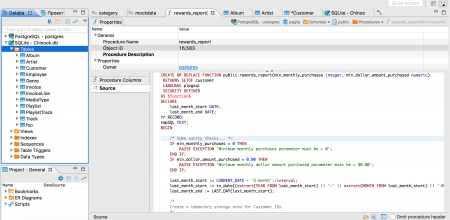
DBeaver 6.1.5 - universal SQL client

Universal Database Tool

Free multi-platform database tool for developers, SQL programmers, database administrators and analysts. Supports all popular databases: MySQL, PostgreSQL, SQLite, Oracle, DB2, SQL Server, Sybase, MS Access, Teradata, Firebird, Hive, Presto, etc.
DBeaver 6.1.5

August 18th, 2019

Data viewer:
  • Virtual primary/foreign keys editors were enhanced
  • Problem with filters on data refresh was fixed
  • Added confirmation dialog before opened result tabs closing
  • Problem with missing updated row count (in script mode) was fixed
  • References panel now remembers last FK/reference selection
  • Value view panel now supports Find/Replace
  • Float values rendering was fixed (numbers rounding is disabled by default)
  • Data transfer:
  • Save of previous target container selections was added
  • Export of tables/queries with complex data types (structs, objects) was improved
  • Connection management:
  • Connection permissions config was added (restrictions of data/metadata changes for a particular connection or connection type)
  • Problem with bootstrap queries and auto-commit state save/load was fixed
  • Multi-project support was improved (use selected project for new connections)
  • Support of empty database passwords was added
  • Copy/paste and drag-n-drop connections between different projects was fixed
  • Database navigator:
  • Default double-click behavior configuration was added (view properties/data/erd)
  • Object edit dialogs are properly sized now (problem with too small dialog window was fixed)
  • Connection type coloring in the main toolbar is back
  • DBeaver toolbars visibility was fixed (for Eclipse plugin version)
  • New DBeaver version automatic downloading (optional) was added
  • MySQL:
  • Datetime columns edit was fixed. Problems with timezone were fixed.
  • Legacy MySQL <4 driver was added (again)
  • PostgreSQL:
  • Automatic transaction error recovery was added (famous "current transaction is aborted" error)
  • Partition management was added (partition create/drop)
  • Support of VACUUM tool for older PG version was fixed
  • Enum items order was fixed (in metadata editor)
  • Legacy PostgreSQL <= 8 driver was added
  • SQL Server: index DDL was improved (now it contains all index properties)
  • Redshift: table DDL generation was fixed ("diststyle AUTO" and other improvements)
  • Hive: struct/array data types support was added
  • Presto: array data types support was fixed
  • DB2 i: routine list reading was fixed
  • We have migrated to the Eclipse 2019-06 platform (fixes many minor UI bugs on Linux)
  • Many other minor bugs were fixed
Source :  https://dbeaver.io/

Wednesday, March 20, 2013

Web Builder is a WYSIWYG (What-You-See-Is-What-You-Get) program used to create web pages. WYSIWYG means that the finished page will display exactly the way it was designed. The program generates HTML (HyperText Markup Language) tags while you point and click on desired functions; you can create a web page without learning HTML. Just drag and drop objects to the page position them 'anywhere' you want and when you're finished publish it to your web server (using the built in Publish tool). Web Builder gives you full control over the content and layout of your web page.

WYSIWYG Web Builder features:
• No HTML knowledge needed!
• Drag and drop objects from the toolbox on the page anywhere you like!
• Site Management. Easily add, edit, clone and structure your web pages from a single file.
• Customizable menus, toolbars, keyboard accelerators, dockable windows, tabs, autohide windows.
• Form layout object to create forms, including actions, hidden fields etc.
• Supports Form fields: Editbox, TextArea, Checkbox, Radiobutton, Combobox and Button.
• Form Wizard to create form in 4 steps. Select from a dozen ready-to-use forms.
• Rich text support: text object can contain different fonts, colors, links and sizes.
• Custom HTML object to insert your own HTML or javascripts.
• ActiveX, JAVA, Flash, Windows Media player, Quicktime, Real Audio and other Plug-In support.
• Publish your entire web site, a single page or a group of pages (to local drive or a web server) .
• Built-in Photo Gallery maker, with lots of cool features like picture frames!
• Built-in Banner maker.
• Rollover images.
• Bulleted Lists: Circle, Disc, Square, Numeric (1, 2, 3), Alpha (a, b, c) , Roman (I, II, III) and custom images.
• Image maps.
• Customize scrollbar colors for Microsoft Internet Explorer.
• Navigation bars.
• Tab Menus.
• Slide Menus.
• Ready-to-use javascripts.
• Template support. Already more than 100 templates available!
• Insert Symbols (special characters).
• Slide Show component .
• Support for third-party add-ons, using the Web Builder Component Developers Kit.
• Import existing HTML pages.
• Hyperlink Style Sheet, to customize the colors/formatting of hyperlinks.
• Built-in Popup support.
• Show optional rulers and ruler guides.
• Page transitions in Page Properties.
• Inline Frame component (IFRAME).
• Go menu: easily create a drop-down navigation menus.
• Menubar: powerful menu script that can mimic complex menus found in popular GUI applications.
• Shape object (Rectangle, Round rect, Ellipse, Diamond, Hexagon, Octagon, Parallelogram, Triangle, Trapezoid, Arrows, Flag, Flower, Heart, Signs, Stars, Talk Bubbles and much more!).
• Embedded OLE component.
• Master page object. This allows you to re-use objects from other pages (master page concept).
• Layer Object for advanced layout possibilities.
• Find/Replace for text objects.
• Validation tools for form components: EditBox, Combobox and TextArea.
• Rotation for shapes and images.
• Properties Inspector for quick object manipulation.
• Ability to group/ungroup objects.
• Image tools: Contrast, Brightness, Hue/Saturation, Flip, Rotate, Resample, Crop and Stencils.
• Image effects: GrayScale, Negative, Sepia, Blur, Soften, Sharpen, Noise, Emboss and more!
• Drawing tools: Line, Line + Arrows, Scribble, Polygon, Curve and Closed Curve.
• Photo gallery border styles/ photo frames.
• Images, shapes and form controls have a new Events Page, to easily add actions to object events!
• The PayPal eCommerce Tools are the quickest and easiest way to add eCommerce to your web site!
• RSS Feed object with podcast option.
• Blog with built-in RSS feed option.
• Google compatible sitemap generator
• and much much more!

Home Page - http://www.wysiwygwebbuilder.com/

Download Link

Source : avaxhome

Thursday, April 12, 2012

Notepad++ is a free source editor and Notepad replacement with the syntax highlighting.

It also gives the extra functionality to the general user: colorize the user defined words. You can print your source code in color (or whatever you want) if you have a color printer (WYSIWYG). Furthermore, Notepad++ includes the multi-view feature, which allows the user to edit the different documents at the same time, and even edit the same document synchronously in 2 different views. Notepad++ supports drag and drop: not only you can drop the file from explorer to open it, but also you can drag and drop a document from a view to another. With all the functionalities, Notepad++ runs as fast as Notepad provided by MS Windows. 

Translator

Subscribe via email

Enter your email address:

Delivered by FeedBurnerfeedburner

Popular Posts

Counter

googlebot